Auro X trading bot: what to check in the aurocptl ad


Checked by The Proofmark editorial team against our methodology before publishing
The Proofmark · Our methodology
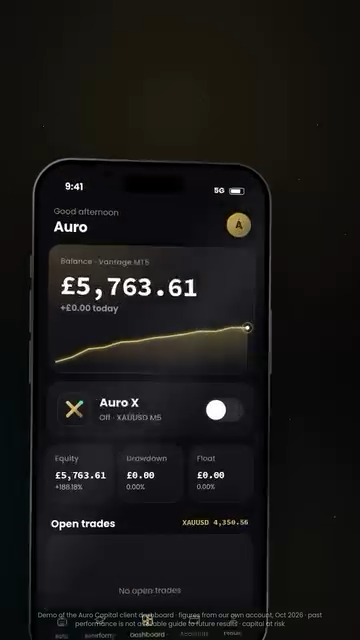
Original video frame at 00:17 · app preview, not verified trading results. Captured 21 October 2026.
The video labels the screen as a demo of the Auro Capital dashboard, using figures from its own account in October 2026. These are provider-supplied figures, not independently confirmed returns. The video warns that past performance does not predict future results and capital is at risk.
What Auro X is being advertised to do
The advert describes an upcoming app and VIP dashboard. It lists live balances, trades, profit and loss figures, and controls for the Auro X bot. It also mentions analytics, a calendar and educational material. The bot is described as running around the clock on a remote server, commonly called a VPS.
Meta showed the ad from aurocptl as active on 21 October 2026, with a start date of 19 October. Its text referred to MetaTrader 5, forex and gold. These are the advertiser's descriptions, not features or results we tested.
The advert leads to the Instagram account aurocptl, where a login was required to continue. An official website, legal operator and customer contract remain unidentified.
A dashboard is not a trading record
A screen that shows profit can explain what an app displays. It cannot, by itself, show whether the figures come from a real funded account, a demonstration or a selected period.
Ask for a complete live trading record with losing periods, fees and the largest fall in the account. The advertised “drawdown” figure means a decline from an earlier account peak. It helps explain losses, but the advert's promise to display that figure is not evidence of the bot's actual risk.
Running all day does not mean earning all day. A bot follows trading instructions; it does not remove the possibility of losses.
Separate the software fee from the money you trade
Before paying, establish three things:
- The seller: which legal business supplies the software, charges the fee and handles cancellation?
- The broker: which separate business holds the trading deposit, and can you access that account directly?
- The permissions: what can the bot or seller do inside your account, and how can you switch that access off?
Check the actual permissions Auro X requests before agreeing. Never give a salesperson a one-time login code or unrestricted device access. Check any broker's exact legal name and domain in the relevant official register for your country.
Check the exact provider before paying
The evidence reviewed does not justify that accusation. The unanswered questions are about identity, terms and independently checkable performance. They should be resolved before payment, but they are not proof of dishonesty.
Other businesses use similar Auro names, but no connection to this advert has been confirmed. Customer losses tied to this offer remain unverified.
If you have contacted aurocptl or already paid
Keep the offer, invoice and payment recipient. Write down whether you bought software or deposited money into a broker account; the same person may promote both, but the payments can have different recipients.
For an unexpected trade or access problem, contact your broker through its own official channel and ask how to secure the account and review connected software. For a disputed software payment, request the written cancellation or refund terms. If you suspect deception, also contact your payment provider promptly. None of these steps guarantees a refund.
If you are unsure who has your money or what you agreed to, request a free phone consultation. We can help you understand the offer and work out your next step.
Sources
Where to get help in your country
Choose your country to see where to check a company, report a scam and get help.
Choose your country to see local contacts. If it is not listed, you can ask our team for help.
🇬🇧 The United Kingdom
🔎 Check the firm
FCA Firm Checker — Search the firm name, its website, or the reference number it gave you.
🚨 Report it
Report Fraud (City of London Police) — Report online or call 0300 123 2040. In Scotland, call Police Scotland on 101.
↩ Ask for your money back
Financial Ombudsman Service — Complain to the firm first, then bring it here. Free, and it can order the firm to pay.
Every address above was opened and checked by us on 30 September 2026. Tell us if one has moved.
Was this article helpful?
Thank you. Your feedback helps us improve.
Your reason has been saved.
Your callback request is received.
Our team will call .
You do not need to send another request. The call is free.
Your reference:
Request a free callback
Leave your number. We will talk through what happened.
Name and phone number are required. All other details are optional.
Your saved draft has been restored.